How to track credit card spending manually
Record each purchase when you make it, give it a useful category and check it against your card statement. Keep repayments separate so the same purchase only appears once in your spending total.
Personal spending guide · By Finance Portfolio · Updated
How to track credit card expenses: the quick answer
To keep track of credit card spending, log each purchase once with its date, amount, category and card account. Compare those entries with posted transactions, account for refunds, and review category totals. Keep the payment you send to the issuer separate from the purchases it repays.
This gives you three distinct numbers: what you bought, how much cash you sent to the card issuer and what you still owe. Combining them into one expense total makes it harder to understand your habits. A spending record answers the first question; your statement and a separate reconciliation note answer the other two.
One purchase, one expense
A $50 grocery purchase followed by a $50 principal repayment is $50 of purchase spending. Counting both as expenses would incorrectly show $100.
Set up manual credit card expense tracking in five steps
A practical routine for credit card expense tracking, with a worked example, a statement checklist and manual records in Finance Portfolio.
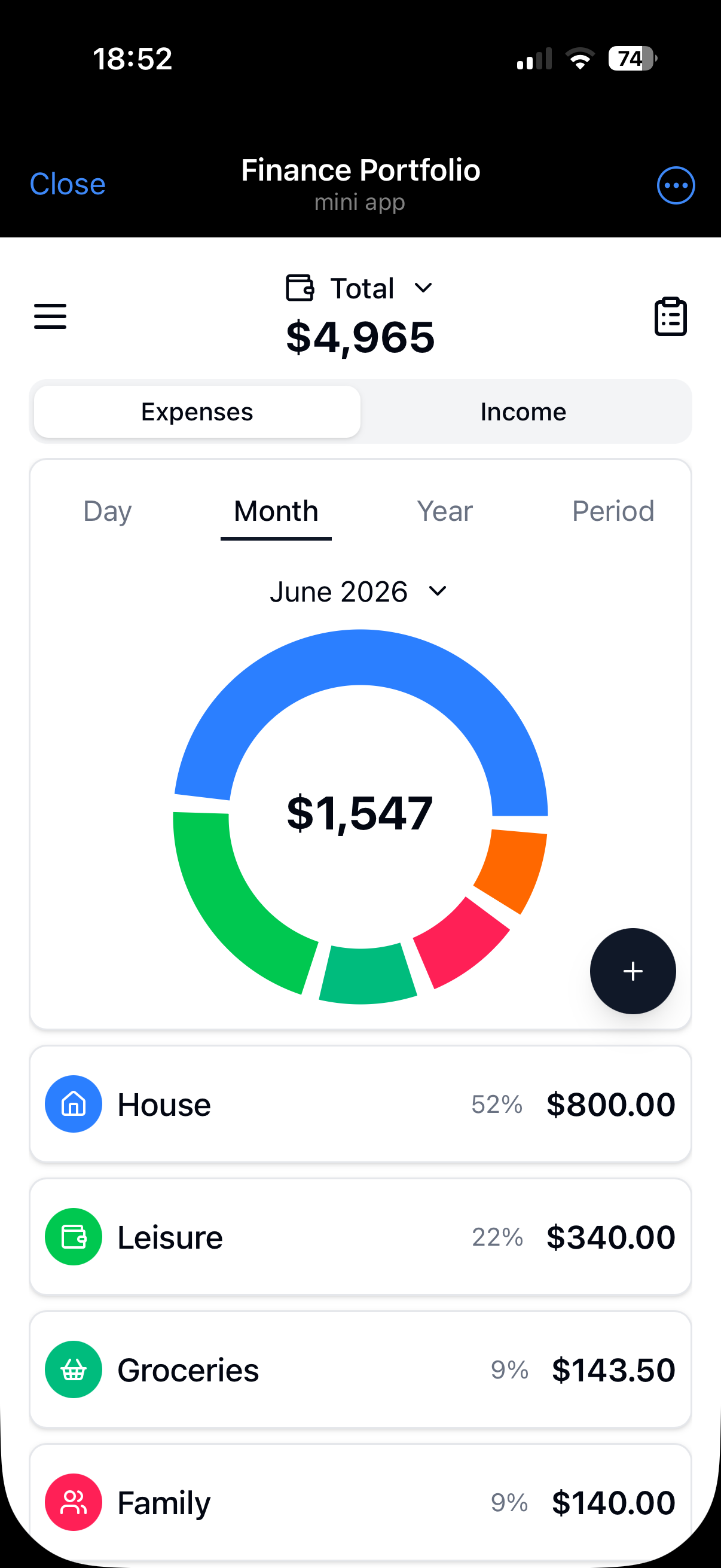
Open the online expense tracker and sign in. Finance Portfolio organizes manually entered transactions by account, category and period. Use the following routine for tracking credit card expenses alongside your issuer’s records.
Choose a start date and a consistent period
Start today or at the beginning of a statement cycle. For monthly budgeting, keep a calendar-month view; for checking the issuer’s records, use the statement’s opening and closing dates. An older unpaid balance belongs in your separate reconciliation note, not in this month’s new purchase expenses.
Keep the payment account identifiable
Use an account with a clear name for the card’s manual records. Free includes two accounts; Premium allows more. Keep the issuer’s balance, available credit and payment details in a separate statement checklist. The account is a place to organize your entries, not an automatically synchronized credit-card liability or available-credit calculation.
Record each purchase once
Enter the amount, category, account and purchase date. For example, record a $42 supermarket visit under Groceries, rather than putting every card purchase in one general Credit card category. Keep the merchant and receipt reference in a separate list if needed for matching later. Entering a purchase soon after paying makes it easier to remember what it was for.
Use a small set of useful categories
Start with suitable standard categories for groceries, transport, home and leisure. Use the same category for similar purchases regardless of whether you pay by card or cash. Premium lets you create custom categories. The account answers which card was used; the category answers what you bought.
Check entries weekly and close the statement cycle
Compare records with posted transactions, match refunds and remove duplicates from your working list. Use the app’s period filters and charts to review actual expenses. Keep your written spending target and repayment checklist alongside those records, and reconcile the full statement when the cycle closes.
Separate card purchases from repayments
When you track credit card spending by purchase date, the expense belongs to the day you bought the item. Paying the bill later reduces the amount owed; it does not mean you bought the item again. Likewise, a balance carried into your starting period is existing debt, not a new shopping expense.
For the purchase-only workflow in this guide, enter the purchases in your expense records and keep repayments in a separate statement checklist. If you maintain a ledger that represents both your bank account and card liability, the principal repayment is a transfer between those records. Finance Portfolio supports transfers between your own accounts, but this guide does not assume a dedicated credit-card liability setup or automatic debt calculation.
A cash-flow review can separately show when money leaves your bank account. Label that view clearly and avoid adding it to your purchase totals. Interest and fees still count as costs when posted; they are separate from the principal you repay.
A worked example: spending and balance tell different stories
Suppose a statement cycle begins with $300 owed from an earlier period. You make three groups of purchases, receive a refund for one of those purchases, incur a fee and interest, and pay $200 to the issuer. All amounts below are fictional USD figures.
| Record | Amount | How to treat it |
|---|---|---|
| Opening unpaid balance | $300 | Earlier debt; exclude from new spending |
| Groceries | $180 | New purchase expense |
| Transport | $60 | New purchase expense |
| Leisure | $90 | New purchase expense |
| Refund for a purchase in this example | -$30 | Reduce the related purchase cost in your reconciliation note |
| Card fee | $10 | Separate cost |
| Posted interest | $5 | Separate cost |
| Payment to the card issuer | -$200 | Reduce debt; exclude from new purchase expenses |
- New purchases
- $330
- Net costs after refund
- $315
- Closing amount owed
- $415
New purchases total $330. In your reconciliation note, subtract the $30 purchase refund and add the $10 fee and $5 interest: net costs are $315. The $200 repayment is excluded from these costs.
Opening debt $300 + net costs $315 − repayment $200 = closing balance $415.
This is a manual statement calculation, separate from the app’s charts. It assumes no cash advances, balance transfers or other adjustments. The fee and interest are illustrative amounts, not rate estimates.
Reconcile your records with the credit card statement
Tracking credit card spending is easier when you check a few entries each week rather than reconstructing a whole month. When the statement arrives, work through this checklist:
- Use the exact statement dates. A calendar-month total can cover a different set of purchases.
- Match each posted purchase to one record by amount and date; use your merchant or receipt list where needed.
- Check pending purchases separately. Confirm final amounts, tips and currency charges before marking them matched; do not enter a second purchase when the original posts.
- List refunds and other credits separately from payments. Match each refund to its original purchase.
- Include separately posted fees and interest as costs. Keep opening debt and principal repayments outside new purchase totals.
- Recalculate the closing balance in your own reconciliation note, then compare it with the issuer’s statement. Investigate differences line by line.
The Consumer Financial Protection Bureau’s credit card statement guide shows purchases, payments, credits, fees and interest as separate parts of a statement. Use those distinctions when matching your own records. Check payment amounts and dates directly with your issuer.
Handle refunds, fees and foreign-currency purchases clearly
Match refunds to the original purchase
Keep both the purchase and the later refund traceable in your reconciliation note, with their dates and amounts. Subtract the refund from the relevant purchase cost for a net-spending comparison. A refund is money returned, not new earnings. If it relates to an earlier month, label that clearly so the current month’s category comparison remains understandable.
Record separately charged costs
Track credit card expenses such as a posted annual fee or interest separately from groceries and other purchases. Use an appropriate existing category or a custom category with Premium. Enter the amount shown by the issuer instead of trying to estimate interest from your purchase total.
Use the posted amount for statement matching
For a purchase abroad, retain the original amount and currency in your separate list, then compare the final charge in the card’s billing currency. Keep separately posted conversion fees visible. Finance Portfolio supports multiple currencies and a base-currency overview, but that overview may differ from your issuer’s final conversion. Never add raw USD and EUR amounts as if they were the same unit.
How to manage credit card spending with a weekly review
Write a spending target for the period outside the app, then compare it with recorded purchases and known pending purchases. For a fictional $500 target and $330 of new purchases, the initial difference is $170. Check unrecorded transactions and upcoming costs before deciding what fits within that target.
Review categories to see which purchases changed the total. Groceries paid with a card and groceries paid in cash belong in the same household spending discussion, even though they use different accounts. The cash expense tracking guide explains how to keep wallet purchases and transfers clear alongside card records.
Use the issuer’s account for the amount due, payment status and available credit. Keep a separate reminder for payment dates. Your spending target is a personal planning reference; Finance Portfolio’s transaction records do not enforce it or schedule a card payment.
Choose the best way to track credit card spending for your routine
Expense tracking with a credit card needs a reliable purchase record and a way to compare it with the statement. The right tool depends on which part you want to make easier.
Notebook: a short purchase list
Useful when you make few purchases and can total them yourself. Include dates, amounts, categories and the card used. Keep enough detail to match each entry to the statement.
Spreadsheet: a flexible reconciliation sheet
Useful for keeping purchases, refunds, opening debt, payments and a balance calculation together. You maintain the formulas and decide whether you are viewing purchase spending, net costs or cash leaving your bank account.
Expense tracker: categorized manual records
Useful for entering everyday expenses and reviewing them by account, category and period. Finance Portfolio provides manual records, transfers, charts and multiple currencies in a browser or Telegram Mini App. Keep statement reconciliation, payment reminders and credit calculations in a separate workflow.
For quick manual entries inside a messenger, explore the Telegram expense tracker. Whichever method you choose, use one record per purchase and keep enough detail to reconcile it later.
Credit card spending FAQ
What is the best way to track credit card spending?
Choose a method you will update consistently. A practical starting point is to record purchases when they happen, categorize them by purpose and reconcile them with posted transactions every week. A spreadsheet can hold the statement calculation; an expense tracker can organize everyday records. Keep repayments separate from purchases.
How do I track credit card expenses without connecting my bank?
Enter each purchase manually with an amount, date, category and account. Check your issuer’s transaction list regularly and add anything you missed. Finance Portfolio works with manual entries in your browser or Telegram; it does not import bank or card transactions automatically.
Should I count my credit card payment as an expense?
If you already counted the purchases, do not add the principal repayment as another purchase expense. Keep it in your statement reconciliation and payment checklist. Interest and fees are separate costs. A cash-flow view may show when money leaves your bank, but it answers a different question from a purchase-spending total.
Why does my spending total differ from my statement balance?
The statement balance can include an earlier unpaid balance, fees, interest, refunds and payments. Your spending total may include only purchases during a calendar month. Compare the same dates and transaction types, and keep pending transactions separate before checking the closing balance.
How do I keep track of credit card spending across several cards?
Keep each card identifiable in your records and use consistent categories across all of them. Check each statement separately before combining purchase totals for your budget. Finance Portfolio Free includes two accounts; Premium allows more accounts. The issuer remains the source for each card’s amount due and available credit.
Can Finance Portfolio manage my credit card debt and due dates?
Use Finance Portfolio for manual income and expense records, accounts, categories, transfers and charts. Keep debt balances, due dates, payment reminders and interest calculations with your card issuer or in a separate checklist. This guide does not describe an automatic debt-management or card-payment service.
Can I track card purchases and cash spending together?
Yes. Keep the accounts identifiable and use consistent spending categories. Record actual purchases once. A movement between your own accounts is separate from buying something; if a withdrawal includes a separately charged fee, that fee is a cost. Reconcile each account using the appropriate records.
Start with your next card purchase
Record the amount, choose a category and account, then set aside a few minutes to check your entries each week. Finance Portfolio Free includes two accounts, standard categories, transaction records, transfers and charts.
Open the expense tracker